
For a while REAPER has been crashing often when I insert a plugin. This is NOT normal behavior and not what I am used to seeing. After a dozen crashes this morning I stopped trying to mix and tried to figure it out.
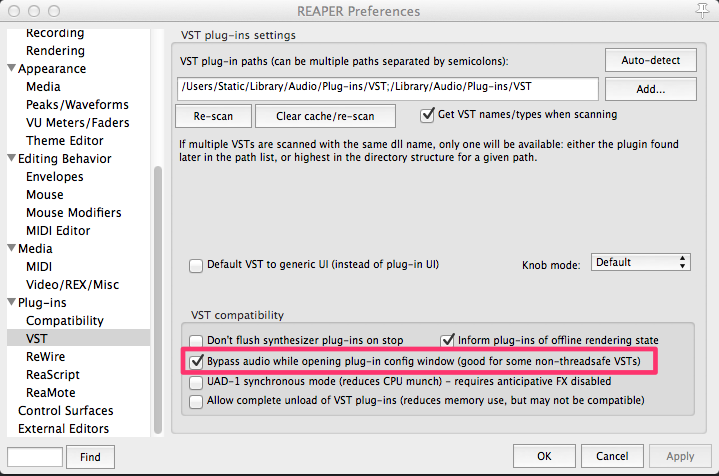
Clearing the plugin cache didn’t help and neither did installing the latest update. Eventually I found a preference that I normally have enabled was actually disabled. This option is called ‘Bypass audio while opening plug-in config window‘ in the Plug-ins>VST settings.
The good news is REAPER doesn’t crash anymore, the downside is playback glitches momentarily when inserting a plugin or opening the UI (which is the reason I disabled it before).
If REAPER is crashing often, give this a try.
Comments
23 responses to “REAPER Crashes When Inserting Plugins?”
@sk4ggs Hello, is REAPER still crashing a lot? This might help. Check out the latest on the blog http://t.co/BKGe4L87
RT @reaperblog: New Post: REAPER Crashes When Inserting Plugins? – http://t.co/4YvUTDmV
Yeah, I saw your tweet yesterday about that. Hopefully there will be a fix soon.
The momentary glitch isn’t really Reaper’s fault in that they’re having to work around buggy VSTs. I assume most DAWs are similar in that they are likely to crash with those VSTs unless they have a similar workaround?
It was pretty random which plugins would crash during playback or stopped. All 3rd party, some Waves, some Slate Digital, and others. Enabling this option fixed it and it was solid for the rest of the day.
It wasn’t that long ago that Pro Tools got the ability to add plugins during playback, and yes there is a momentary mute, often a long moment, often a long silence as the whole computer crashes.
Thank you so much!
It keeps crashing on me. I’m currently using the 5.2 update. I’ve heard great things but this DAW is completely unstable, I think I’m switching back to Ableton.
would be nice to know what the crash log says. There’s usually a clue to why.
What’s the path to the crashlog file?
on OSX you open Console, on Windows you want Event Viewer.
Reaper ver. 5.961/64
It keeps crashing on me everytime an audio unit is inserted. Vst’s no issues at all only AU. Digging a little bit I found out that it only happens when using “Add Fx or Quick add fx from the normal drop down menu. If you open an AU plugin and copy it to another track as many times you want..nothing happens , No crashes at all. As soon you insert an AU via drop down menu it will crash. Too bad cuz I was really enjoying this DAW but this issue just turned off my creativity on the spot. I will summit the problem to developers.
I can’t confirm this on my system. I tried some IK Multimedia, AIR, and XLN Audio plugins, adding AU versions in various ways without issue.
after a crash MacOS will show you a report of the issue. What did it say?
You can use the “Console” utility (applications/utility/console.app) and search for reaper to find older reports.
Having the same problem..did you find a fix?
On my computer, it doesnt crash, but SEEMS TO hang up. The loading of plugins is REALLY slow. I cleared the cache and attempted to rescan, but nothing seemed to happen, so i uninstalled and reinstalled reaper – and now, it scans when i start the application. It goes VERY slow, but it does advance to other plugins. I remember this slow loading of plugins from last time i reformatted my computer as well, and then it worked out fine after this initial load of plugins… Hopefully it will not take more than a few hours, LOL!
Update. It finished loading the plugins, and still the first plugin i loaded onto a track, took some time to load. I then tried another plugin, and this time, it only took a few seconds. Hopefully it will work fine from now on.
Update… No, its not working fine at all, LOL! It loads an empty track just fine, but at least the first plugin i place on that track, takes several minutes to load… Never seen this before… How do i fix this???
don’t think you’ve said which plugins are causing the trouble
I am a beginner on this….tried many DAW VST in the past 6 months.
most of them have problems …Studio One recording button not armed..
Band in Box..VST not working..Mixpad….crashed…..So I buy a cheap one REAPER only few days, VST crashed sound coming on and off….Can anyone help ? PLEASE…..read over hundreds articles ……..REAPER is no help…..
Hi Lydia, Are you using 32 bit or 64 bit? This not only applies to which version of reaper you downloaded onto your computer it also applies to which vsts you downloaded. Were they 32 bit or 64 bit…this is the main reason reaper will crash on you trying to run a 64bit on a 32 bit or trying to run a 32 bit on 64 this will not work, the plugin will not work. Next, before you get tangled up in vsts outside of your DAW, try the ones that came with your software, they are amazing and they do not crash. I am having this problem because I installed a program called arcade and although the programs sound great it constantly crashes reaper because it does not want to play nice and I am about to uninstall it.
Wait a minutes…..It is not just the VST…It also the playing back on the vocal wave file too.( miss playing sounds)….so ?????
What os are you running Windows or mac? I use windows 8.1, Windows 10 is not Daw friendly, if you have this as an os system then half of your problem starts there. What audio interface are you running. I have been using reaper since 2010 and until I started messing around with other developers like slate digital, ozone, splice, arcade and the list goes on and on I never had this problem. Your system should be simply plug and play unless you have hardware then it gets a little different. I do hope, as this is December you have resolved these issues but if not do reach out and I will try to help you.
I can’t thank you enough for this! I have been able to re-open my session which was corrupted. Thank you thank you thank you THANK YOU! You are the best!
Hey, I’m experiencing an issue that sounds sort of related… any chance there’s a new fix in place for non-thread safe plugins?
Crashing when I click the FX button on a track, and sometimes when a render finishes. Some waves, some XLN, Valhalla, Oeksound – hard to say who the culprit is.